Plugin functions
You can start programming with the EYE+ plugin through EPSON RC+.
Important
The camera configuration and the hand-eye calibration must be done from EYE+ Studio before programming any command. For further information, please refer to the Camera configuration wizard and Hand-eye calibration wizard.
To call a plugin function in your program, you must use the Call instance.
The following 7 functions allow to create a simple and easy-to-integrate pick and place.
EYE_CONFIGURE
EYE_STOP
EYE_START_PRODUCTION
EYE_GET_PART
EYE_PREPARE_PART
EYE_RAW_COMMAND
EYE_CHECK_LAST_ERROR
Warning
Do not use the functions that start with EYE_INTERNAL_. These functions are used internally
to manage the communication with your EYE+.
EYE_CONFIGURE
Parameters
ip_address$ - is the IP address of your EYE+. The parameter must be a string with the IP address format
x.x.x.x.port_number - is the port number of your EYE+. The parameter must be an Int32.
client_number1 - is the number of the first client reserved for the communication. The parameter must be an integer in the range of 201-216 and different from
client_number2.client_number2 - is the number of the second client reserved for the communication. The parameter must be an integer in the range of 201-216 and different from
client_number1.point_number - is the number of the robot point reserved in robot1.pts to store the coordinates of the part found. The parameter must be an integer in the range of 0-999.
Description
This command must always be called at the beginning of your program.
It defines and configures the clients that will be used in
Setup > System Configuration > Controller > TCP / IP.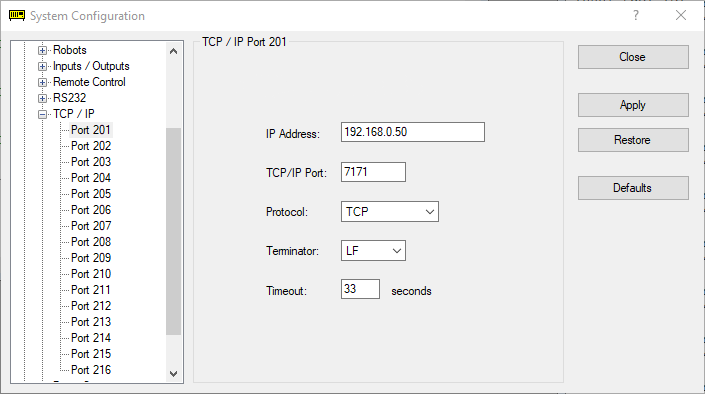
Fig. 4 Client 201 configured after calling the command
EYE_CONFIGURE("192.168.0.50", 7171, 201, 202, 5)Note
Once you have chosen the
client_number1andclient_number2, consider that the associated communication lines are reserved for the plugin.It reserves one robot point in robot1.pts.
Usage example
Function main

    ' Reserve communication lines 201 and 202 and position number 5 (position P5).
    ' Configure the lines with network settings: 192.168.0.50:7171
    Call EYE_CONFIGURE( "192.168.0.50", 7171, 201, 202, 5 )
    If EYE_CHECK_LAST_ERROR = 602 Then
        ' ERROR
        Exit Function
    EndIf

Fend
EYE_START_PRODUCTION
Parameters
recipe_id - the recipe’s unique identifier. The parameter must be an Int32 between 1 and 65535.
Description
This command must be called to start EYE+ in production state using the right recipe.
Usage example
Function main

    ' Reserve communication lines 201 and 202 and position number 5 (position P5).
    ' Configure the lines with network settings: 192.168.0.50:7171
    Call EYE_CONFIGURE( "192.168.0.50", 7171, 201, 202, 5 )
    If EYE_CHECK_LAST_ERROR = 602 Then
        ' ERROR
        Exit Function
    EndIf

    ' Start EYE+ in production using the correct recipe identifier
    Call EYE_START_PRODUCTION(12345)
    If EYE_CHECK_LAST_ERROR <> 0 Then
        ' ERROR
        Exit Function
    EndIf

Fend
EYE_STOP
Parameters
state$ - one of the EYE+ states. The parameter must be a string.
Description
This command is used to stop an EYE+ state. It should be called at the end of your program to bring EYE+ back to the idle state.
Usage example
Function main

    ' Reserve communication lines 201 and 202 and position number 5 (position P5).
    ' Configure the lines with network settings: 192.168.0.50:7171
    Call EYE_CONFIGURE( "192.168.0.50", 7171, 201, 202, 5 )
    If EYE_CHECK_LAST_ERROR = 602 Then
        ' ERROR
        Exit Function
    EndIf

    ' Start EYE+ in production using the correct recipe identifier
    Call EYE_START_PRODUCTION(12345)
    If EYE_CHECK_LAST_ERROR <> 0 Then
        ' ERROR
        Exit Function
    EndIf

    Call EYE_STOP("production")
    If EYE_CHECK_LAST_ERROR = 0 Then
        ' EYE+ is not in production anymore
    EndIf
Fend
EYE_GET_PART
Return
The returned part is stored in the position variable P(EYEPos).
When a part is found, only the components (X, Y, U) values are overwritten. You have to assign the other
components (Z, V, W) yourself according to your robot setup.
Warning
If you do not assign the other components (Z, V, W), the position may not be reachable.
You must set these components after calling the EYE_CONFIGURE command. If you do the assignment before the call, your values will be replaced by the default values.
Description
This command is used to request one part from EYE+. This is a blocking command, meaning it will keep going until it gets a response.
Usage example
Function main

    ' Initialize robot conditions
    Motor On
    Speed 20
    Accel 10, 10

    ' Move to home position
    Go P(HomePos)

    ' Reserve communication lines 201 and 202 and position number 5 (position P5).
    ' Configure the lines with network settings: 192.168.0.50:7171
    Call EYE_CONFIGURE( "192.168.0.50", 7171, 201, 202, 5 )
    If EYE_CHECK_LAST_ERROR = 602 Then
        ' ERROR
        Exit Function
    EndIf

    ' Initialize components of EYEPos (here is an example using a 6-axis robot)
    CZ(P(EYEPos)) = 200
    CV(P(EYEPos)) = 0
    CW(P(EYEPos)) = 180

    ' Start EYE+ in production using the correct recipe identifier
    Call EYE_START_PRODUCTION(12345)
    If EYE_CHECK_LAST_ERROR <> 0 Then
        ' ERROR
        Exit Function
    EndIf

    ' Move out of field of view
    Go P(OutOfView)

    Call EYE_GET_PART
    If EYE_CHECK_LAST_ERROR = 0 Then
        ' Move above the part regarding your current tool and robot base
        Go P(EYEPos) +Z(50)

        ' Move to the part
        Move P(EYEPos)

        ' Activate your gripper to pick the part
        ' ...

        ' Move above the part regarding your current tool and robot base
        Go P(EYEPos) +Z(50)
    Else
        ' Error while requesting a part
    EndIf

    ' Move out of field of view
    Go P(OutOfView)

    Call EYE_STOP("production")
    If EYE_CHECK_LAST_ERROR = 0 Then
        ' EYE+ is not in production anymore
    EndIf
Fend
EYE_PREPARE_PART
Description
This command is used to request one part from EYE+. This command is not a blocking command. The part coordinates can be retrieved later with the EYE_GET_PART command.
Usage example
Function main

    ' Initialize robot conditions
    Motor On
    Speed 20
    Accel 10, 10

    ' Move to home position
    Go P(HomePos)

    ' Reserve communication lines 201 and 202 and position number 5 (position P5).
    ' Configure the lines with network settings: 192.168.0.50:7171
    Call EYE_CONFIGURE( "192.168.0.50", 7171, 201, 202, 5 )
    If EYE_CHECK_LAST_ERROR = 602 Then
        ' ERROR
        Exit Function
    EndIf

    ' Initialize components of EYEPos (here is an example using a 6-axis robot)
    CZ(P(EYEPos)) = 200
    CV(P(EYEPos)) = 0
    CW(P(EYEPos)) = 180

    ' Start EYE+ in production using the correct recipe identifier
    Call EYE_START_PRODUCTION(12345)
    If EYE_CHECK_LAST_ERROR <> 0 Then
        ' ERROR
        Exit Function
    EndIf

    Call EYE_PREPARE_PART

    ' Move out of field of view
    Go P(OutOfView)

    ' Do something with your robot
    ' ...

    Call EYE_GET_PART
    If EYE_CHECK_LAST_ERROR = 0 Then
        ' Move above the part regarding your current tool and robot base
        Go P(EYEPos) +Z(50)

        ' Move to the part
        Move P(EYEPos)

        ' Activate your gripper to pick the part
        ' ...

        ' Move above the part regarding your current tool and robot base
        Go P(EYEPos) +Z(50)
    Else
        ' Error while requesting a part
    EndIf

    ' Move out of field of view
    Go P(OutOfView)

    Call EYE_STOP("production")
    If EYE_CHECK_LAST_ERROR = 0 Then
        ' EYE+ is not in production anymore
    EndIf
Fend
EYE_RAW_COMMAND
Parameters
command$ - is the raw command to send to EYE+. This parameter must be a string.
socket_number - is the socket number that will be used to send the command. The parameter must be an integer whose value is equal to 1 or 2 (respectively the first or second line you have chosen in EYE_CONFIGURE).
Warning
Be careful not to call the same socket in more than one robotic task. If you do, you will encounter the following error: 698 - Client already in use.
Return by reference
response$ - is the parameter entered by reference that will contain the response received from EYE+.
Description
This function is used to send raw commands to EYE+. Refer to chapter Commands to know what kind of commands can be sent.
Usage example
Function main

    String response$

    ' Reserve communication lines 201 and 202 and position number 5 (position P5).
    ' Configure the lines with network settings: 192.168.0.50:7171
    Call EYE_CONFIGURE( "192.168.0.50", 7171, 201, 202, 5 )
    If EYE_CHECK_LAST_ERROR = 602 Then
        ' ERROR
        Exit Function
    EndIf

    ' Start EYE+ in production using the correct recipe identifier
    Call EYE_RAW_COMMAND("start production 12345", 1, ByRef response$)
    If EYE_CHECK_LAST_ERROR = 0 And response$ = "200" Then
        ' EYE+ is in production
    EndIf

    Call EYE_STOP("production")
    If EYE_CHECK_LAST_ERROR = 0 Then
        ' Not in production anymore
    EndIf
Fend
EYE_CHECK_LAST_ERROR
Return
The last error detected is returned as direct output. The output is an integer.
Description
This function is used to check if an error has occurred.
If no error has occurred, the output is equal to 0.
If an EYE+ error has occurred, the output is equal to one of the error codes listed in Error codes (error type
4xxor5xx).If a plugin error has occurred, the output is one of the following errors displayed in section Plugin errors (error type
6xx).
Once the error is returned as output from the function, the error is cleared internally (value set to 0).
Usage example
Function main

    ' Reserve communication lines 201 and 202 and position number 5 (position P5).
    ' Configure the lines with network settings: 192.168.0.50:7171
    Call EYE_CONFIGURE( "192.168.0.50", 7171, 201, 202, 5 )
    If EYE_CHECK_LAST_ERROR = 602 Then
        ' ERROR
        Exit Function
    EndIf

    ' Start EYE+ in production using the correct recipe identifier
    Call EYE_START_PRODUCTION(12345)
    If EYE_CHECK_LAST_ERROR = 0 Then
        ' EYE+ is in production
    EndIf

    Call EYE_STOP("production")
    If EYE_CHECK_LAST_ERROR = 0 Then
        ' Not in production anymore
    EndIf

Fend