Plugin functions

You can start programming with the EYE+ plugin on MotoSim or Teach Pendant. For this you need to create your own JOB program.

To call a plugin function in your program, you must use the CALL JOB: command as follows:

CALL JOB:EYE_START_PRODUCTION ARGF 32439

The following 7 commands are basic functions allowing to create a simple and easy to integrate pick and place.

  • EYE_CONFIGURE.JBI

  • EYE_START_PRODUCTION.JBI

  • EYE_PREPARE_PART.JBI

  • EYE_GET_PART.JBI

  • EYE_STOP.JBI

  • EYE_RAW_COMMAND.JBI

  • EYE_CHECK_LAST_ERROR.JBI

Warning

Do not use the functions that start with EYE_INTERNAL_. These functions are used internally to manage the communication with your EYE+.

EYE_CONFIGURE(IpAddress, Port, StartingPoint)

Parameters

  • IpAddress - is the IP address of your EYE+. The parameter must be a string with the IP address format x.x.x.x.

  • Port - is the port number of your EYE+. The parameter must be an integer.

  • StartingPoint - is the starting point of the memory area reserved by the plugin. The parameter must be an integer. Make sure that they do not overlap with variables already used in your program.

    Note

    Refer to section Reserved memory for more details on the range.

Description

This command must always be called at the beginning of your program to define the client configuration and to define the starting point of the reserved memory zone.

Warning

If you have not configured the clients correctly, you will get the following error 602 - Client configuration error and the client configurations will not be changed.

Usage example

' EYE+ configuration is 192.168.0.50:7171
' Reserved memory area from 300 to 600 maximum
CALL JOB:EYE_CONFIGURE ARGF "192.168.0.50" ARGF 7171 ARGF 300
'
CALL JOB:EYE_CHECK_LAST_ERROR
GETS LI000 $RV
IFTHEN LI000<>0
  ' Error
ENDIF
'
' ...

EYE_START_PRODUCTION(RecipeId)

Parameters

  • RecipeId - the recipe’s unique identifier. The parameter must be a double between 1 and 65535.

Description

This command must be called to start EYE+ in production state using the right recipe.

Usage example

CALL JOB:EYE_CONFIGURE ARGF "192.168.0.50" ARGF 7171 ARGF 300
CALL JOB:EYE_START_PRODUCTION ARGF 65447
'
CALL JOB:EYE_CHECK_LAST_ERROR
GETS LI000 $RV
IFTHEN LI000=0
  ' EYE+ is in production
ENDIF
'
' ...

EYE_STOP(State)

Parameters

  • State - is an EYE+ states. The parameter must be a string.

Description

This command is used to stop an EYE+ state.

Usage example

CALL JOB:EYE_CONFIGURE ARGF "192.168.0.50" ARGF 7171 ARGF 300
CALL JOB:EYE_START_PRODUCTION ARGF 65447
'
' ...
'
CALL JOB:EYE_STOP ARGF "production"

EYE_GET_PART

Returns

The returned part is stored in the point P[StartPoint].

When a part is found, only the X, Y and RZ values are overwritten. You have to assign the other components (Z, RX, RY) yourself according to your robot setup.

Description

This command is used to request one part from EYE+. This is a blocking command, meaning it will keep going until it gets a response.

Important

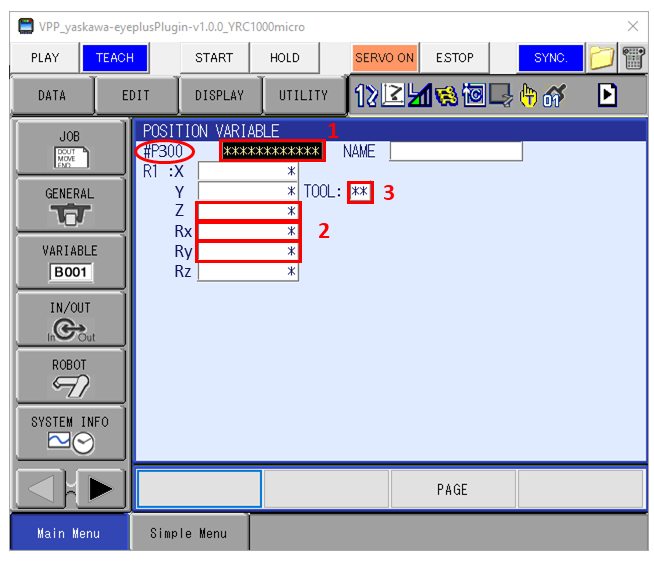
You must initialize the output position at least once before using the EYE_GET_PART command. To do this you need to go to the output position configured as P[StartPoint] in the Yaskawa position variables and change the following information:

  • Section 1: Select either BASE, ROBOT or UTIL. The choice depends on your application. Your choice must match the robot frame you have defined for your pick and place.

  • Section 2: You must initialize the position elements Z, Rx, Ry.

  • Section 3: You must select the correct tool to use for your pick and place application.

../_images/EYEPos_initialization.png

Fig. 7 Initialize P[StartPoint]

Usage example

CALL JOB:EYE_CONFIGURE ARGF "192.168.0.50" ARGF 7171 ARGF 300
CALL JOB:EYE_START_PRODUCTION ARGF 65447
CALL JOB:EYE_GET_PART
'
CALL JOB:EYE_CHECK_LAST_ERROR
GETS LI000 $RV
IFTHEN LI000=0
  SETE P300 (3) xxx ' (Value Z)
  SETE P300 (4) xxx ' (Value Rx)
  SETE P300 (5) xxx ' (Value Ry)
  MOVL P300 V=75.0
ENDIF
'
' ...

EYE_PREPARE_PART

Description

This command is used to request one part from EYE+. This command is not a blocking command. The part coordinates can be retrieved later with the EYE_GET_PART command.

Usage example

CALL JOB:EYE_CONFIGURE ARGF "192.168.0.50" ARGF 7171 ARGF 300
CALL JOB:EYE_START_PRODUCTION ARGF 65447
'
' Assign the other components of the part position to be reachable
SETE P300 (3) xxx '(Value Z)
SETE P300 (4) xxx '(Value Rx)
SETE P300 (5) xxx '(Value Ry)
'
CALL JOB:EYE_PREPARE_PART
'
' ...
'
CALL JOB:EYE_GET_PART
CALL JOB:EYE_CHECK_LAST_ERROR
GETS LI000 $RV
IFTHEN LI000=0
  ' Move to part position
  MOVL P300 V=75.0
ENDIF
'
' ...

EYE_RAW_COMMAND(Client)

Parameters

  • Client - is the client number that will be used to send the command. The parameter must be an integer whose value is equal to 1 or 2.

Returns

The raw response of the command is stored in a reserved byte memory area.

Note

Refer to Table 1 for the reserved memory area for client 1 and refer to Table 2 for the reserved memory area for client 2.

Description

This function is used to send raw commands to EYE+. Refer to chapter Commands to know what kind of commands can be sent.

First, the send memory area must be filled in with the following command:

JOB:GSI_MAKEBARRAY ARGF LI000 ARGF LI001 ARGF 0 ARGF LS000
  • LI000 is a local integer that specify the position in memory where length of the data to send is stored. It can have two values:

    • LI000 = StartingPoint when using client 1,

    • LI000 = StartingPoint + 150 when using client 2.

  • LI001 is a local integer specifying the position in memory of the first byte to write. It can have two values:

    • LI001 = StartingPoint + 1 when using client 1,

    • LI001 = StartingPoint + 151 when using client 2.

  • LS000 is a local string containing the data to send.

    Warning

    The length of the message that can be sent to EYE+ can be up to 64 characters. However, the maximum length of a string variable (e.g. LS000), can only be up to 32 characters.

    If you need to send a command longer than 32 characters, you must filled the Bytes in 2 steps and set the length of the data to send properly. Check example 2: Usage example for long commands (more than 32 characters)

The raw command to send is stored in a reserved byte memory area.

Table 1 Memory area for data sent and received by client 1: from StartingPoint to StartingPoint + 149

Byte position

Variable type

Description

StartingPoint + 0

BYTE

Size of data send on client 1

StartingPoint + 1

BYTE

First byte of the data to send on client 1

BYTES

StartingPoint + 65

BYTE

Last byte of the data to send on client 1

StartingPoint + 66

BYTE

Size of data received on client 1

StartingPoint + 67

BYTE

First byte of the data received on client 1

BYTES

StartingPoint + 130

BYTE

Last byte of the data to received on client 1

StartingPoint + 131

BYTE

Memory reserved for internal use..

BYTE

Memory reserved for internal use..

StartingPoint + 149

BYTE

Memory reserved for internal use..

Table 2 Memory area for data sent and received by client 2: from StartingPoint + 150 to StartingPoint + 300

Byte position

Variable type

Description

StartingPoint + 150

BYTE

Size of data to send on client 2

StartingPoint + 151

BYTE

First byte of the data to send on client 2

BYTES

StartingPoint + 215

BYTE

Last byte of the data to send on client 2

StartingPoint + 216

BYTE

Size of data received on client 2

StartingPoint + 217

BYTE

First byte of the data received on client 2

BYTE

StartingPoint + 280

BYTE

Last byte of the data to received on client 2

StartingPoint + 281

BYTE

Memory reserved for internal use..

BYTES

Memory reserved for internal use..

StartingPoint + 300

BYTE

Memory reserved for internal use..

Usage example for short commands (less than 32 characters)

Listing 1 send command ‘start production 65447’
 1' Configure EYE+ and set StartingPoint = 300
 2CALL JOB:EYE_CONFIGURE ARGF "192.168.0.50" ARGF 7171 ARGF 300
 3'
 4' Choose position in memory containing the size of data to send on client 1
 5SET LI000 300 ' = StartingPoint + 0
 6' Choose position in memory containing the first data to send on client 1
 7SET LI001 301 ' = StartingPoint + 1
 8'
 9' Set string variable to send command "start production 65447"
10SET LS000 "start production 65447"
11'
12' Write the string "start production 65447" (LS000) from byte 301 (LI001)
13' The lenght of variable is written in Byte B300 (LI000 = 300)
14CALL JOB:GSI_MAKEBARRAY ARGF LI000 ARGF LI001 ARGF 0 ARGF LS000
15'
16' Send the full command
17CALL JOB:EYE_RAW_COMMAND ARGF 1
Listing 2 Read response
 1' Get EYE_RAW_COMMAND response code
 2' Define the beginning of the memory area for data received on client 1
 3SET LI002 367 ' = StartingPoint + 67
 4CHR$ LS000 B[LI002] ' Get first caracter to string
 5INC LI002
 6CHR$ LS002 B[LI002] ' Get second caracter to string
 7CAT$ LS003 LS000 LS002
 8INC LI002
 9CHR$ LS000 B[LI002] ' Get third caracter to string
10CAT$ LS003 LS003 LS000
11'
12IFTHEN LS003="200"
13  ' SUCCEED
14ENDIF

Usage example for long commands (more than 32 characters)

Listing 3 send command ‘set_parameter image_after_send true’
 1' Configure EYE+ and set StartingPoint = 300
 2CALL JOB:EYE_CONFIGURE ARGF "192.168.0.50" ARGF 7171 ARGF 300
 3'
 4' Choose position in memory containing the size of data to send on client 1
 5SET LI000 300 ' = StartingPoint + 0
 6' Choose position in memory containing the first data to send on client 1
 7SET LI001 301 ' = StartingPoint + 1
 8'
 9' Set 2 string variables to send command "set_parameter image_after_send true"
10SET LS000 " set_parameter image_" ' lenght of 20
11SET LS001 " after_send true"      ' lenght of 15
12'
13' Write the string "set_parameter image_" (LS000) from byte 301 (LI001)
14' The lenght of variable is written in Byte B300 (LI000 = 300) : B300 = 20
15CALL JOB:GSI_MAKEBARRAY ARGF LI000 ARGF LI001 ARGF 0 ARGF LS000
16'
17' Calculate beginning of 2nd part of the command
18' Position of the first character + previous length = 321
19SET LI002 EXPRESS LI001 + 20
20'
21' Write the string "after_send true" (LS001) from byte 321 (LI002)
22' The lenght of variable is written in Byte B300 (LI000 = 300) : B300 = 15
23' WARNING: this new length value has erased the previous length value
24CALL JOB:GSI_MAKEBARRAY ARGF LI000 ARGF LI002 ARGF 0 ARGF LS001
25'
26' Write in the byte position 300 the correct value of the total length to send
27' Combination of both lengths = 20 + 15 = 35
28SET B300 35
29'
30' Send the full command
31CALL JOB:EYE_RAW_COMMAND ARGF 1

EYE_CHECK_LAST_ERROR

Returns

The last detected error is returned with $RV. The returned value is an integer.

Description

This function is used to check if an error has occurred.

  • If no error has occurred, the output is equal to 0.

  • If an EYE+ error has occurred, the output is equal to one of the error codes listed in Error codes (error type 4xx or 5xx).

  • If a plugin error has occurred, the output is one of the following errors displayed in section Plugin errors (error type 6xx).

Once the error is returned as output from the function, the error is cleared internally (value set to 0).

Usage example

CALL JOB:EYE_CONFIGURE ARGF "192.168.0.50" ARGF 7171 ARGF 300
CALL JOB:EYE_START_PRODUCTION ARGF 65447
'
CALL JOB:EYE_CHECK_LAST_ERROR
GETS LI000 $RV
IFTHEN LI000<>0
    ' ...
ENDIF
'
' ...